
What Is Email Appending?
How to turn incomplete customer records into a reachable, revenue-ready email audience — the process, the match rates, the benefits, and the compliance rules that make it work.
Key takeaways
- Email appending adds verified, deliverable email addresses to records you already own.
- It works by matching your data — name, company, postal address — against a permission-based reference database.
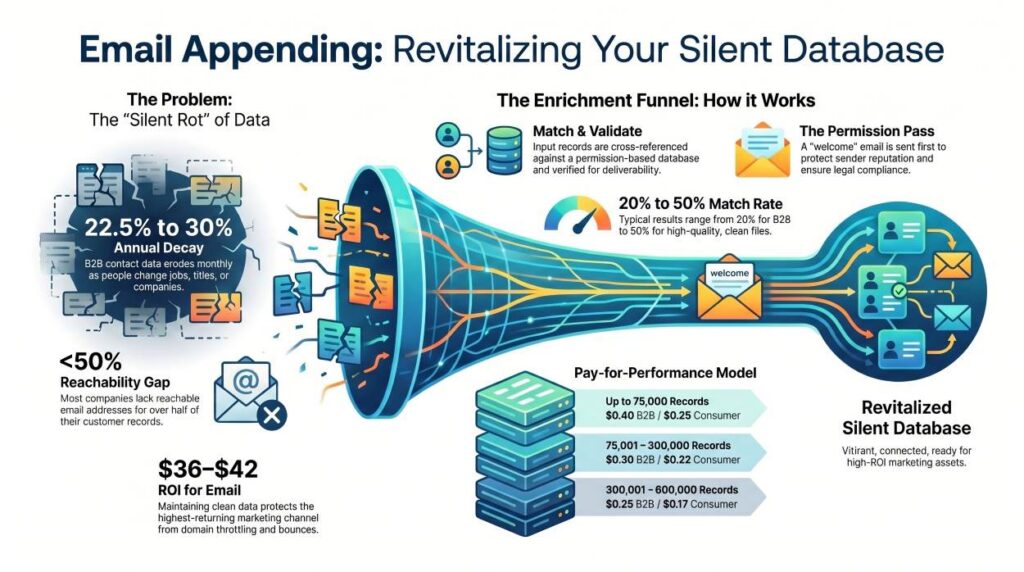
- Typical match rates run 20–40%, and clean files can reach 45–50%.
- It is permitted under U.S. CAN-SPAM with a permission pass; GDPR, CASL, and CCPA add stricter consent rules.
- Because B2B data decays roughly 22.5–30% a year, appending is an ongoing program, not a one-time fix.
What is email appending?
Email appending is the process of adding missing or updated email addresses to your existing customer database by matching your records — typically name, company, and postal address — against a verified, permission-based reference database, then validating each address for deliverability before it is returned to you.
Most companies hold email addresses for less than half of their customers and prospects. The rest of the file is full of valuable records — real buyers with names, companies, and mailing addresses — that simply have no reachable email channel attached. Email appending closes that gap. Instead of buying a cold list of strangers, you enrich people who are already in your world: past purchasers, event registrants, trade-show scans, and accounts your sales team has touched.
The output is not a generic catch-all like info@ or sales@. A quality append returns individual, deliverable addresses tied to the specific person on the record, so your messages reach a human decision-maker rather than a shared mailbox nobody reads.
Why email appending matters
Customer data does not stay accurate. People change jobs, companies merge, addresses are abandoned, and entire domains disappear. In B2B especially, that erosion is relentless: industry research consistently puts database decay at roughly 2.1% per month — about 22.5% to 30% per year, and some fast-moving sectors have seen monthly decay spike well above 3%. A 100,000-record list left untouched can lose 25,000–30,000 valid contacts in twelve months without a single email being sent.
That silent rot has a hard cost. Sending to dead addresses drives up bounce rates, and once bounces climb past a few percent, mailbox providers throttle your domain — so even your good messages start landing in spam. Poor data also corrupts segmentation and personalization, which are the levers that make email the highest-ROI channel in marketing.
How the email appending process works
You submit a file of customer records, a provider matches those records against a permission-based email database, every match is validated for deliverability, and your enriched file is returned with individual addresses — usually followed by a “permission pass” email before full campaigning begins.
A reputable append is methodical and conservative. Match criteria are kept tight — matching on the individual name rather than a last name or household — so you receive the right person’s address, not a plausible-looking guess. The four core stages look like this:
Submit
You provide records with name, company name (B2B), and postal address fields.
Match
Records are cross-referenced against a premium, permission-based email database.
Validate
Each match is verified for deliverability and confirmed as an individual address.
Deliver
Your enriched file is returned — you pay only for validated, deliverable matches.
The permission pass
The first message sent to newly appended addresses is called a permission pass (or welcome message). It introduces your brand, explains how the recipient came to hear from you, and offers an easy opt-out. Best practice is to wait roughly a week after the permission pass to collect bounces and opt-outs before scaling up — opt-out rates on a well-run pass are typically low, often around 2%. This step protects your sender reputation and keeps the program compliant.
What match rate should you expect?
A realistic email append match rate is 20–40% of your input file, with clean, well-maintained records reaching 45–50%. Consumer files generally match at higher rates than B2B files because consumer email reference data is broader.
Match rate is the single number most buyers fixate on, but it is downstream of your input quality. Accurate, deduplicated records with full names and current postal addresses match far better than messy files with abbreviations, nicknames, or stale addresses. Treat any vendor promising a near-total match with healthy skepticism — in appending, an honest 30% beats an inflated 80% built on loose matching that fills your file with the wrong people.
The benefits of email appending
Done well, appending is one of the most cost-efficient ways to grow reachable audience because you are reactivating relationships you already paid to acquire. The main benefits:
- Reach more of the people you already own. Convert “unreachable” records into an active email audience without buying cold lists.
- Recover dormant and lapsed customers. Re-open a direct channel to past buyers whose emails went stale.
- Protect deliverability and sender reputation. Validated, deliverable addresses keep bounce rates low so more mail reaches the primary inbox.
- Sharpen segmentation and personalization. A more complete profile lets you target by role, company, or behavior instead of blasting everyone.
- Lower cost per reachable contact. Enriching existing records is typically cheaper than acquiring net-new leads of equal quality.
- Strengthen every other channel. A clean, unified record powers better CRM, automation, and multichannel (email + direct mail + ads) coordination.
Email append vs. reverse email append
These two services solve opposite problems. Email append starts with a name and address and finds the email. Reverse email append starts with an email address and fills in the missing details around it — name, phone, and postal address — so you can build a complete, multichannel profile.
| Email Append | Reverse Email Append | |
|---|---|---|
| You start with | Name, company, postal address | An email address |
| You receive | A validated email address | Name, phone, postal address & more |
| Best for | Activating an offline / postal file for email | Enriching a list of email-only signups |
| Primary goal | Open a direct email channel | Build a complete customer profile |
Is email appending legal and compliant?
Email appending is permitted in the United States under the CAN-SPAM Act when you send a permission pass and include a working opt-out and physical address. Stricter consent-based rules apply under GDPR (EU), CASL (Canada), and CCPA/CPRA (California), so appended contacts in those jurisdictions need extra care.
Compliance is what separates responsible appending from spam. The safeguards that keep a program clean are the same ones that protect deliverability: a permission-based source database, individual-level validation, a clear permission pass, prompt opt-out handling, and accurate sender identification. Requirements vary by region:
| Framework | Region | Consent model | Core requirement |
|---|---|---|---|
| CAN-SPAM | United States | Opt-out | Honor opt-outs within 10 business days; include a physical address |
| GDPR | EU / EEA | Opt-in / lawful basis | Documented legal basis; right to deletion; disclose data source |
| CASL | Canada | Express / implied | Demonstrable consent before sending; clear sender ID |
| CCPA / CPRA | California | Notice + opt-out | Privacy disclosure; “Do Not Sell or Share” handling |
A reliable partner will work only from permission-based data, keep a global suppression list, and never buy scraped or cheap lists that contain spam traps. When in doubt about a specific jurisdiction, confirm the requirements with your legal counsel before deploying.
Best practices and how often to append
Because data decay is continuous, appending works best as a recurring program rather than a one-off project. A practical rhythm:
- Append annually or biannually for most databases; quarterly for high-velocity teams adding leads constantly.
- Back up your file before any enrichment so you can restore the original if needed.
- Clean before you append. Deduplicate and standardize names and addresses first — better input means a better match rate.
- Insist on individual-level matching and validated, deliverable output (never info@ aggregates).
- Send a permission pass first and wait about a week to capture bounces and opt-outs before full deployment.
- Pay only for validated matches and confirm the vendor’s data is permission-based and compliant.
How email appending is priced
Appending is usually priced per validated record — you are billed only for deliverable addresses successfully added to your file — and the per-record rate drops as file volume rises. B2B appends typically cost more than consumer appends because business data is harder to source and verify. The reference ranges below illustrate how volume tiers work:
| Input file size | B2B (per validated record) | Consumer (per validated record) |
|---|---|---|
| Up to 75,000 | $0.40 | $0.25 |
| 75,001 – 300,000 | $0.30 | $0.22 |
| 300,001 – 600,000 | $0.25 | $0.17 |
| 600,001 – 1,000,000 | $0.20 | $0.15 |
| 1,000,001 – 5,000,000 | $0.12 | $0.12 |
| Over 5,000,000 | $0.09 | $0.08 |
Figures reflect Reach Marketing’s published tiers and are shown to illustrate the per-record, pay-for-results model. Because you are billed only for valid, deliverable matches, the spend scales directly with the value you receive.
Ready to reconnect with the customers you can’t currently reach?
Reach Marketing appends validated, permission-based email addresses to your records — and pays-for-performance, so you’re billed only for deliverable matches.
Speak With an ExpertFrequently asked questions
What is email appending in simple terms?
What is a good email append match rate?
How long does an email append take?
Is email appending the same as buying an email list?
How often should I run an email append?
Will appended addresses hurt my sender reputation?
Related reading: Email Append Services ·
Contact Append ·
Data Hygiene ·
Email Glossary
Match rates, decay figures, and pricing ranges cited here reflect general industry research and Reach Marketing’s published service tiers, and will vary with data quality and jurisdiction. This guide is informational and not legal advice; confirm regional compliance requirements with qualified counsel.